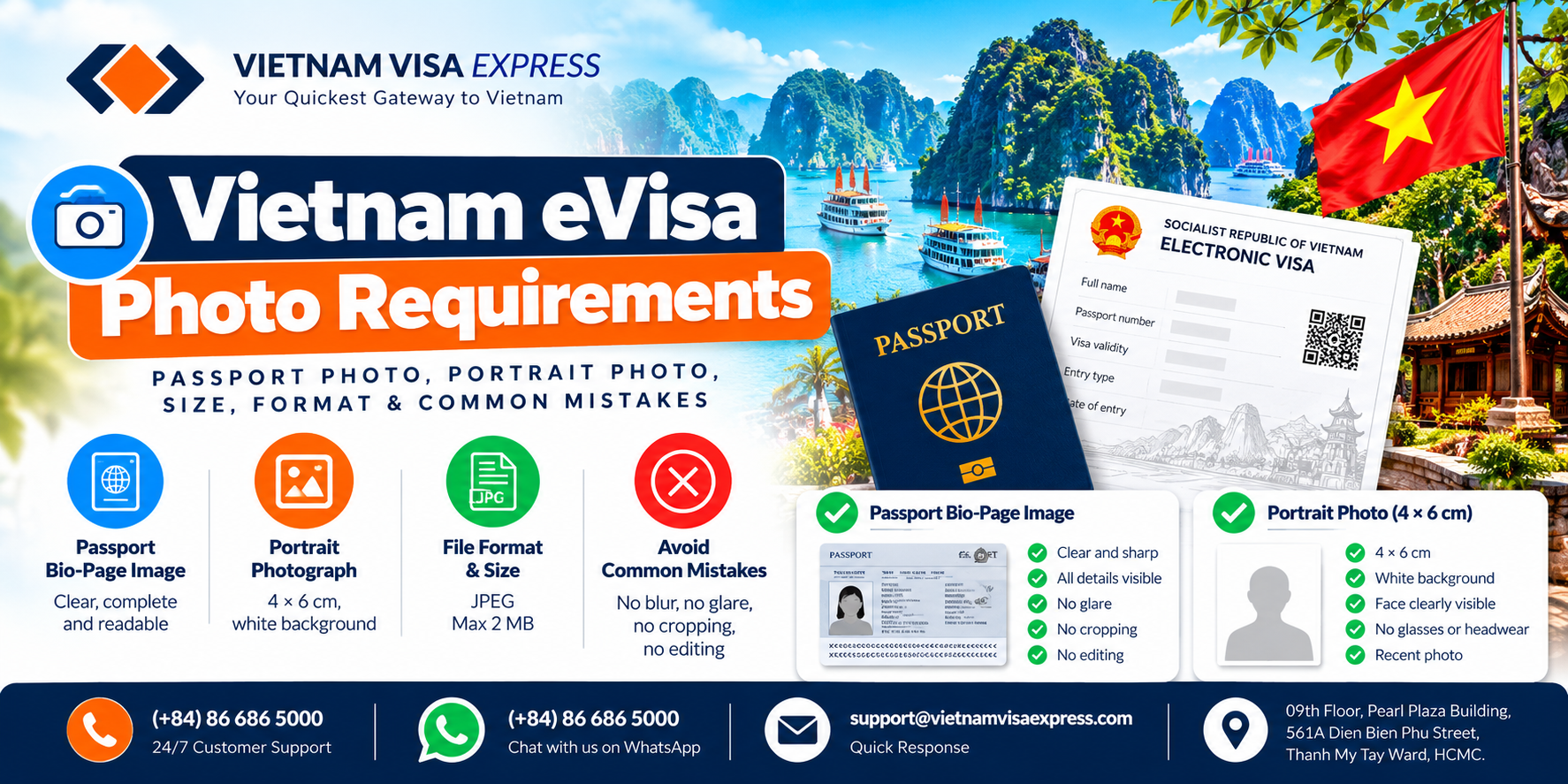
A Vietnam eVisa application requires two separate images: a passport bio-page image and a recent portrait photograph. Both must be clear, accurate, and meet the applicable upload requirements.
Poor-quality images, missing passport details, or unsuitable portrait photographs can cause application problems and may require corrections.
This guide explains how to prepare both images, avoid common mistakes, and check your files before submitting your Vietnam eVisa application.
Passport Bio-Page Image Requirements
Your passport image must show the passport you intend to use when traveling to Vietnam.
If you hold more than one passport or have recently renewed your travel document, make sure the passport image and application information refer to the same document.
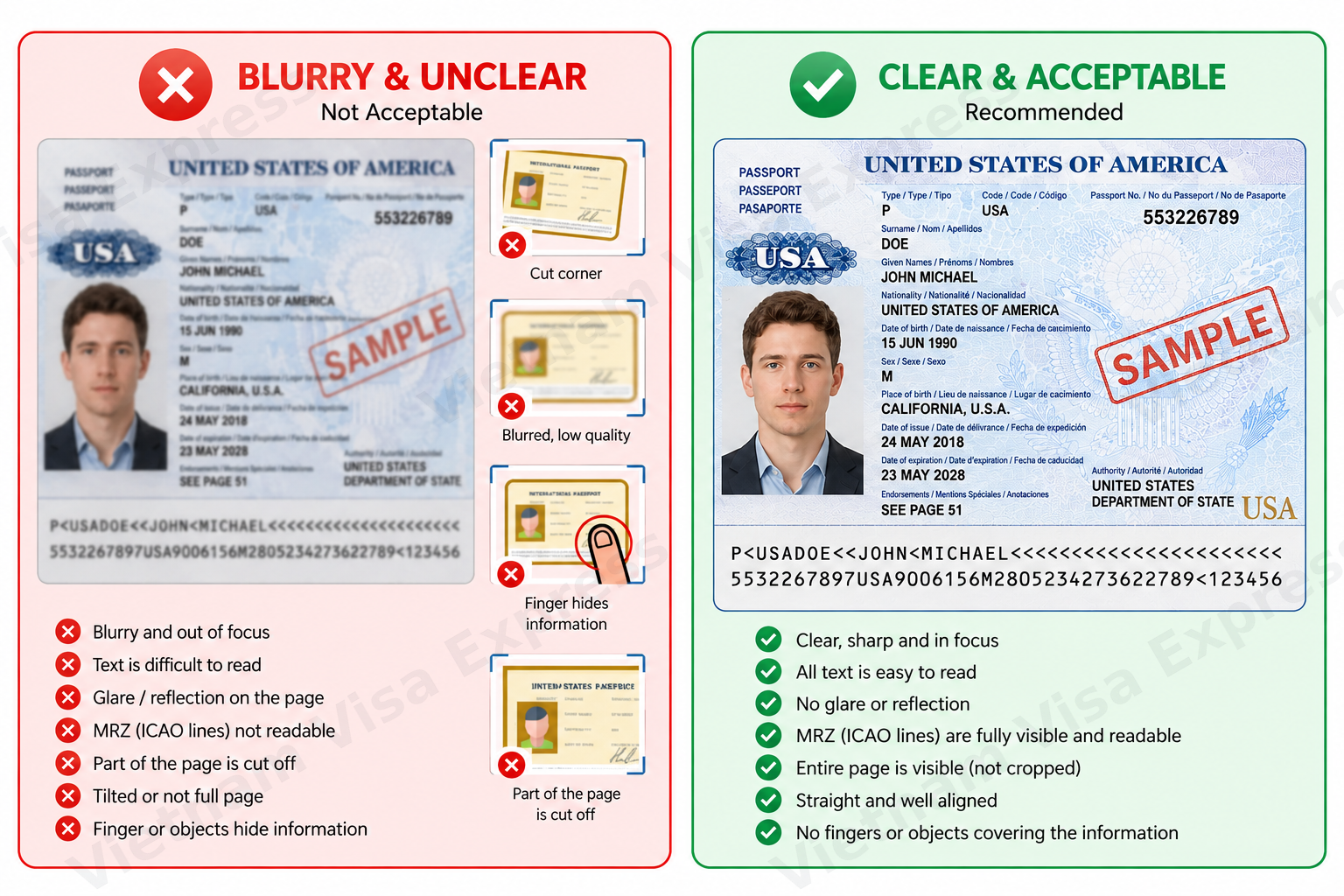
A good passport image should:
- Show the requested passport bio page.
- Keep all important information fully visible.
- Be clear, sharp, and properly focused.
- Make your name, passport number, and other details easy to read.
- Have sufficient lighting without strong reflections or glare.
- Avoid fingers or other objects covering information.
- Preserve the original passport information without alteration.
After taking the photograph, open the saved image and zoom in to check the details.
Ask yourself:
Can I clearly read my name, passport number, and other passport details without guessing?
If not, take another photograph or use a clearer scan.
Common Passport Image Mistakes
Even when a passport is valid, a poorly captured image may be unsuitable for an eVisa application.
Blurry or out-of-focus images
Make sure the camera focuses on the passport information rather than the background.
If important characters are unreadable, take a new photograph instead of relying on digital sharpening.
Glare and reflections
Passport pages may reflect camera flashes or overhead lighting.
If glare covers your name, passport number, photograph, or other important information, adjust the lighting and photograph the page again.
Cropped or incomplete passport pages
Do not remove information required for the application.
If cropping is permitted, ensure that all requested details remain visible and readable.
Fingers or objects covering information
Place the passport on a stable surface and avoid covering any part of the requested information.
Strong camera angles
Photographing the passport from a steep angle can distort the text.
Keep the camera as straight and stable as possible.
Editing or altering passport information
Your uploaded image must accurately represent the original document.
Do not modify passport numbers, names, dates, photographs, machine-readable information, or security features.
Cropping or resizing may be acceptable when permitted by the upload requirements, but the underlying passport information must remain unchanged.
Vietnam eVisa Portrait Photo Requirements
Your portrait photograph is separate from your passport bio-page image. Its purpose is to help identify you as the traveler.
Vietnam’s eVisa application requirements specify a recent portrait photograph measuring 4 × 6 cm, showing your face directly toward the camera, without glasses or headwear, against a white background.
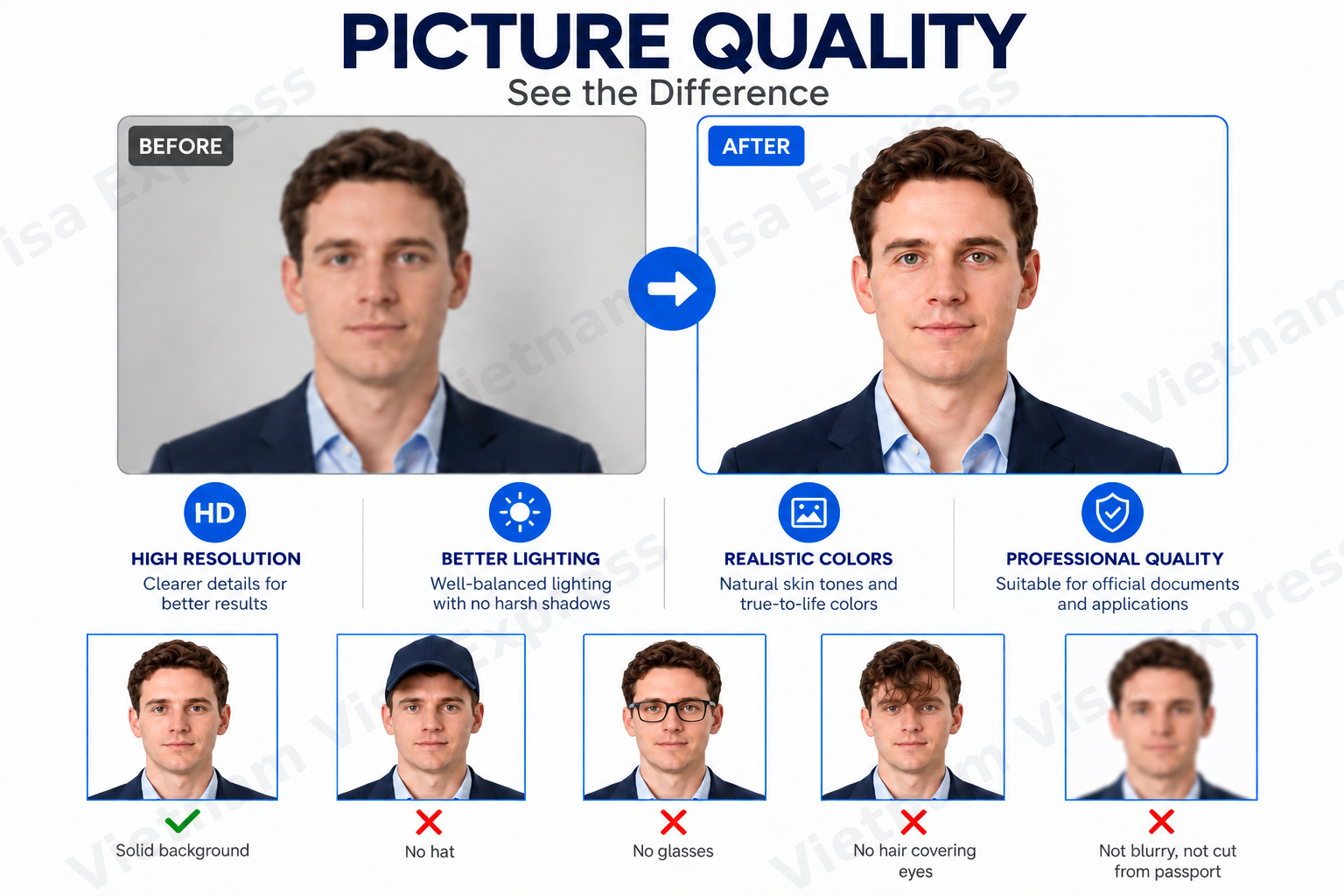
Your portrait photo should:
- Clearly show your full face.
- Show you looking directly at the camera.
- Be recent and accurately reflect your current appearance.
- Have a plain white background.
- Be sharp, well-lit, and properly focused.
- Have no glasses or headwear.
- Avoid hair or other objects obscuring important facial features.
- Have no heavy filters, beauty effects, or alterations that change your appearance.
Use suitable clothing and a natural facial expression.
Can I take my eVisa portrait with a smartphone?
Yes. A smartphone photograph can be suitable if it meets the applicable requirements.
When using a phone:
- Choose a plain white background.
- Use even lighting without strong shadows.
- Hold the camera steady and at approximately face level.
- Look directly into the camera.
- Check the saved photograph before uploading.
Professional photography equipment is not necessarily required. What matters is whether the final image meets the application requirements.
Should I wear glasses?
No. Prepare your Vietnam eVisa portrait without glasses.
This helps ensure your eyes and facial features remain clearly visible.
What background should I use?
Use a plain white background.
Avoid patterned walls, other people in the background, strong shadows, artificial background effects, or filters that alter your appearance.
Vietnam eVisa Photo Size, Format & Dimensions
Before uploading your images, check the technical specifications required by your application channel.
Vietnam’s published electronic visa application requirements specify the following for portrait photographs:
| Requirement | Portrait Photo |
|---|---|
| Photo dimensions | 4 × 6 cm |
| File format | JPEG |
| Maximum file size | 2 MB |
| Face position | Looking directly at the camera |
| Background | White |
| Glasses | Not permitted |
| Headwear | Not permitted |
The passport bio-page image must also satisfy the upload requirements displayed by the application system.
Important: Technical upload limits may differ between application systems or change over time. Always follow the instructions shown on the portal or application form you are using.
If you need to resize or convert an image:
- Keep a copy of the original file.
- Check that the converted image remains clear.
- Ensure passport details are not altered.
- Confirm that the final file meets the upload requirements.
Simply changing a filename extension does not properly convert an image into another format.
For current government application instructions, visit the Official Vietnam eVisa Portal.
How to Prepare and Upload Your Images
Preparing your files before starting an application can help reduce avoidable mistakes.
Step 1: Prepare both images
Save a clear passport bio-page image and a separate portrait photograph for each applicant.
Step 2: Check image quality
Open both files at their original resolution.
Confirm that the passport information is readable and that the portrait clearly represents the traveler.
Step 3: Check file requirements
Make sure your files meet the accepted format, size, and other technical requirements.
Step 4: Upload the correct files
Upload the passport image and portrait photograph to their corresponding fields.
If you are preparing applications for several travelers, keep each person’s files separate.
Step 5: Review the uploaded images
Where an upload preview is available, check that:
- The correct files have been selected.
- The images display properly.
- Neither image has unexpectedly rotated.
- Passport information remains visible.
- The portrait is clear and correctly displayed.
Step 6: Verify your application details
Compare the information entered in the application against the passport itself.
A correct passport image does not guarantee that manually entered details are accurate.
Always check both the uploaded files and the information entered in your application.
Protect your passport information
Passport images contain sensitive personal information. Submit them only through an appropriate official portal or a legitimate visa assistance provider.
Avoid posting passport images, application codes, or identifying information publicly. Be cautious when using unfamiliar online image converters.
Final Vietnam eVisa Photo & Passport Checklist
Before submitting your application, complete this final review.
| Passport Bio-Page Image | Portrait Photograph |
|---|---|
| ✓ Correct passport | ✓ Correct traveler |
| ✓ Requested page visible | ✓ Full face clearly visible |
| ✓ Important text readable | ✓ Looking directly at camera |
| ✓ Clear and in focus | ✓ Clear and well-lit |
| ✓ No glare covering details | ✓ No glasses or headwear |
| ✓ No information obscured | ✓ Plain white background |
| ✓ No identifying details altered | ✓ No heavy filters or retouching |
Final application checks:
- Both images meet the applicable technical requirements.
- The correct files have been uploaded.
- The upload previews have been reviewed.
- The passport information entered matches the original document.
- Each applicant’s images belong to the correct traveler.
What If You Submitted a Poor-Quality Image?
If your Vietnam eVisa application has already been submitted and is showing Processing, do not automatically assume that an unclear image is causing the delay.
A Processing status alone does not identify the specific reason an application has not yet received a final result.
If the Immigration Department requests a correction or replacement image, follow the instructions provided for your application.
If no correction request has been issued, review your application status and processing timeline before submitting another application.
For more information, see our Pending Vietnam eVisa Checklist.
If your departure date is approaching and your existing application remains pending, Vietnam Visa Express offers Expedited Pending eVisa Assistance, subject to your application status and processing conditions.
Frequently Asked Questions
Can I use a scanned passport image?
A suitable scan may be used if accepted by the application system. The requested passport page must remain complete, clear, and readable.
Can I crop my passport image?
Cropping may be acceptable if the application channel permits it and all required information remains visible. Do not crop out important passport details.
Can I edit or enhance a blurry passport image?
Avoid editing that alters or reconstructs identifying information. If the original image is unreadable, taking a new photograph or scan is generally preferable.
Can I wear glasses in my Vietnam eVisa photo?
No. Vietnam's published eVisa portrait requirements specify a photograph without glasses.
Does a poor-quality photo mean my eVisa will be rejected?
Not necessarily. An unsuitable image may result in a correction request or other processing problems. The outcome depends on the application review by the relevant authorities.
My eVisa is still Processing. Does that mean my photo is wrong?
No. A Processing status does not establish that the photograph is incorrect. Check your application status and any correction requests before taking further action.
Ready to Apply for Your Vietnam eVisa?
Preparing clear passport and portrait images is an important step toward submitting an accurate Vietnam eVisa application.
Vietnam Visa Express provides assistance with document preparation, application review, and eVisa processing to help travelers avoid preventable application mistakes.
Applying for a new Vietnam eVisa?
Already submitted an application that is still pending?
Get Help With a Pending Vietnam eVisa→
For general information about eligibility, validity, and visa options, visit our Vietnam eVisa Service page.